Integrating user experience design in your branding and marketing requires a fresher look at how consumers interact with your brand and consume content.
-
 Retargeting is the process of targeting website visitors based on their interest or behavior, with ads tailored to their level of interest in your brand or business, across an advertising network. Retargeting allows you to place conversion tracking onto your website so you can track which users have come to your website via your social media ads. With retargeting you can target existing customers, website visitors on Facebook, Instagram or Twitter. Retargeting helps you place your brand Top of Mind.
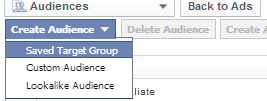
Facebook offers targeting options for retargeting visitors to your site, and visitors of Fan page with Custom Audience and Engagement Audience. Engagement Audience allows you to reach visitors who have previously interacted with Facebook content. Engagement Audience option is available within Custom Audience section in the Ads manager.

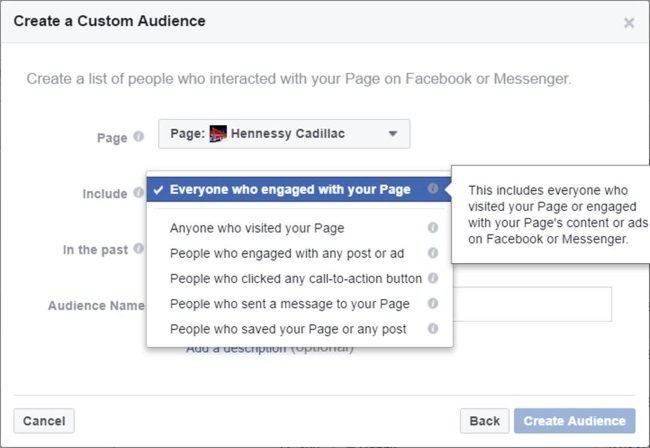
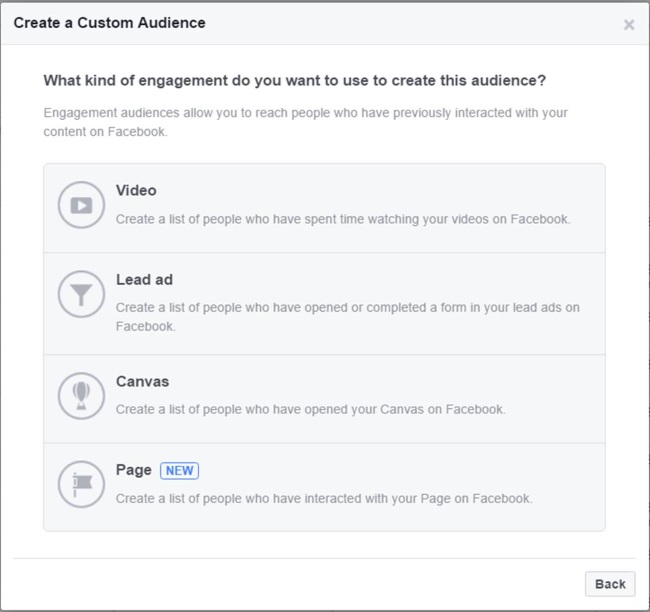
Retargeting on Social Media works as visitors take the time to convert and visit your store a number of times prior to making a purchase. Here are four ways you can benefit from retargeting on Social Media.
Increased Conversions
You can increase conversions by targeting visitors who visit a specific Landing page on your site. This can be done by choosing specific Landing Page in “Create Your Custom Audience” section. You can also choose to retarget email subscribers by uploading your list, increasing the chance of conversion exponentially. You can also target Email subscribers from a list by uploading the same to Custom Audience.

Upselling your Products and Service
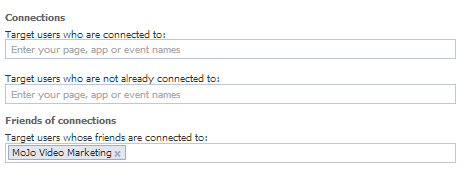
You can retarget existing customers with an offer that is designed to sell a higher priced product or service. You can also easily target existing fans of your Facebook page. Targeting existing fans and existing customers works out to be more cost-effective and provides a subscriber base that is more likely to convert.
Expand Reach
Expand reach for your campaigns by targeting Lookalike Audiences that can be created based on your fans or Custom Audiences. This can be easily done by choosing Lookalike audience option.

Increased Engagement
Retargeted audiences spend more time on your site than first time visitors. The retargeted audience spend increased time and are more engaged when you retarget them for a specific purpose.
To learn how to retarget on Facebook, click here.
-
 Planning your Holiday Season Social Media Campaign can engage users and help you achieve your Social Media goals during Holiday Season.
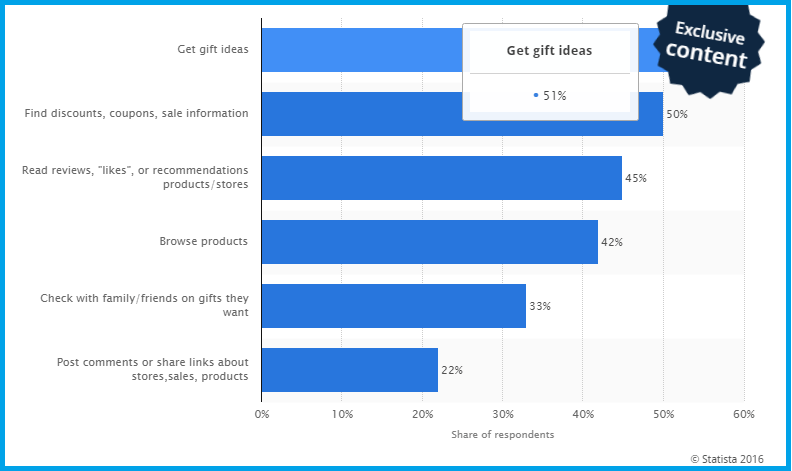
According to a survey in 2015, as high as 51 percent users turned to Social Media for Gift Ideas. Nearly half the users look for Discounts, Coupons and sale information on Social Media.
With the growing importance of Social Media in the buyer journey, It’s important for brands to be ready with a social media plan that brings measurable results.
Start with Your Objectives
Objectives are the overarching reason for your campaign. The objective for your Holiday Campaign are often linked to your business objectives.
Objectives can vary drastically from brand to brand, and industry to industry. For example, some brands want to tailor their holiday campaigns to increase customer retention, while others are focused on amplifying reach in the marketplace. Whatever your objective is, set it and let it be the guiding principle behind the rest of your campaign plan.
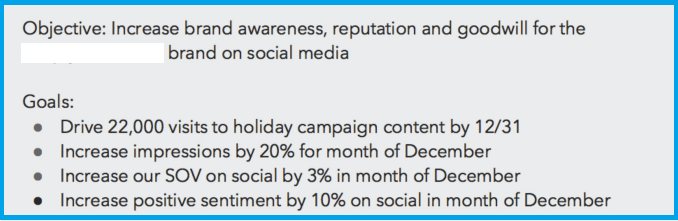
An example of Objective can be :
” Increase awareness, reputation and goodwill for Brand X on social media”

Create Your Goals
Next step is creating goals that are mapped to your overall objective. Goals are the building blocks for your campaign. They are
• Specific (simple, sensible, significant).
• Measurable (meaningful, motivating).
• Achievable (agreed, attainable).
• Relevant (reasonable, realistic and results-based).
• Time bound (time-based, time limited, time/cost limited, timely, time-sensitive)
Create a Plan
Your plan should include
Goals Audience Breakdown Content Requests Timeline Budget Measurement Plan
Write down the content marketing plan giving details for each of the elements as far as possible.
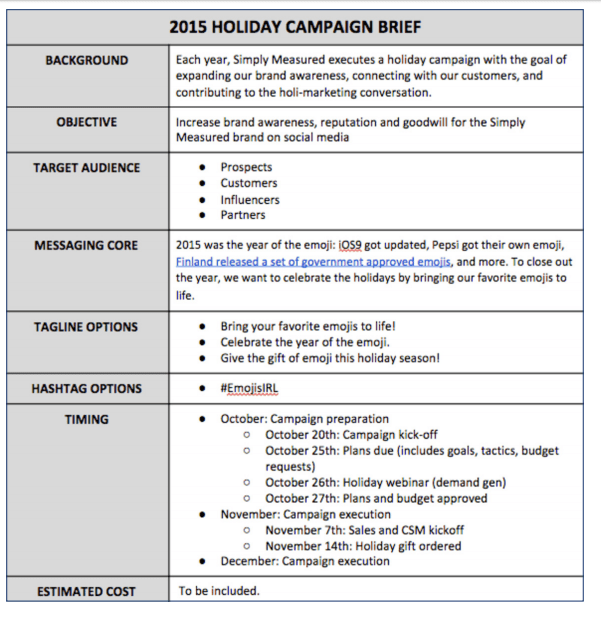
Make a Campaign Brief
To ensure consistency in message make a campaign brief document, so that all key stakeholders are aligned. Outline the key factors that are likely to contribute to the success of your campaign. Include Remarketing activities to ensure all audiences are reached on social media channels.
Create a Tracking Document
Enlist all the key initiatives for your Holiday Campaign and create a tracking document for all content elements , including Blog, Website, Social Media and Email. Use a tracking document that details all activities, responsibility and weekly completion of activities. Monitor and track roll-out of activities to ensure timely roll-out.
Identify KPIs For Measurement
Measure your performance on different social media channels with KPIs that are most relevant. Monitor performance across channels, even if you are focusing on one or two channels.

Hashtag Monitoring
To leverage the conversation surrounding the key topics start with hashtag monitoring. Track your campaign Hashtag for the goals you want to achieve. Monitor earned impressions for your Hashtag. Find Top influencers around your hashtag. Once you know the conversation surrounding your Hashtag and other trending hashtag you can optimize content for Brand Awareness goal.
Monitor Earned Mentions
Track earned mentions for your brand. As important as it is that your content is liked, it’s equally important that your content is shared. Create a report to understand the profile of audience that is interacting and sharing your content.
Create a Reporting Cadence
Analyze your performance at regular intervals to understand performance of your campaigns and measure achievement rate for goals.
Summarize Results
Create a summary of results to see the achievement of results vis-a-vis the goals. How many audiences did you reach? How many new followers did you gain? What kind of lift in conversation were you able to generate?
To know more, Click here.
-
Using Instagram stories for Holiday Season can provide an all new way to engage the users on the go and mobile devices. Instagram has added new tools to Instagram stories “Boomerang, Mentions and links” that make story telling on Instagram more fun and engaging. Instagram ads are now available in vertical format.

Create a Preview Montage with a series of Images
To celebrate the Holiday Season with your remarkable offers, use Instagram stories to give a preview of deals and offers with Boomerang on Instagram.You can capture shots of deals available in your stores as a preview to the audiences.
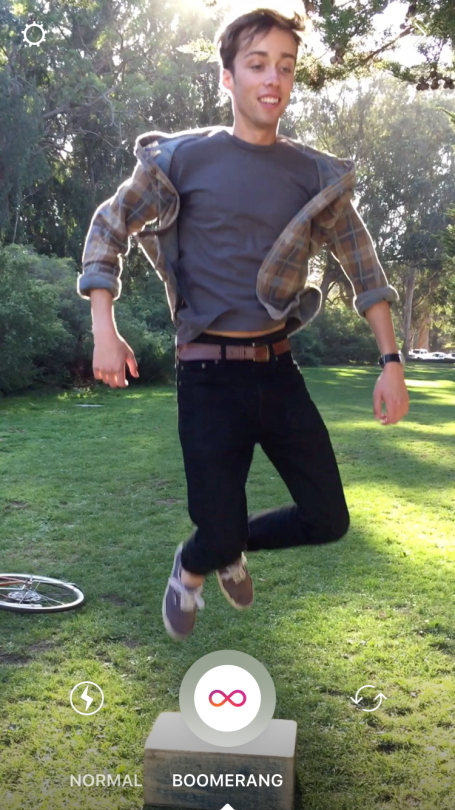
Create a Boomerang with these simple steps. Swipe right from your feed to open the stories camera. A new format picker under the record button lets you select “Boomerang” mode. Tap record and the camera will stitch together a burst of photos into a mini video that plays forward and backward. Then share it to your story.Use Mentions in Your Story
Use @Mentions in your story to engage audiences. You can choose to mention “Early Bird” offers and winners of Early Bird Offers using mentions in your story.
Use See More Links
Instagram is testing “See More” links that allow users to see more of the story with “See More” links. This is a test that lets verified accounts add links so it’s easy to learn more.

To learn about using Instagram stories, for your business, click here.