• socialmedia1Planning your Holiday Season Social Media Campaign can engage users and help you achieve your Social Media goals during Holiday Season.

    According to a survey in 2015, as high as 51 percent  users turned to Social Media for Gift Ideas. Nearly half the users look for Discounts, Coupons and sale information on Social Media.

    With the growing importance of Social Media in the buyer journey, It’s important for brands to be ready with  a social media plan that brings measurable results.


    Start with Your Objectives

    Objectives are the overarching reason for your campaign. The objective for your Holiday Campaign are often linked to your business objectives.

    Objectives can vary drastically from brand to brand, and industry to industry. For example, some brands want to tailor their holiday campaigns to increase customer retention, while others are focused on amplifying reach in the marketplace. Whatever your objective is, set it and let it be the guiding principle behind the rest of your campaign plan.

    An example of Objective can be :

    ” Increase awareness, reputation and goodwill for Brand X on social media”

    since

    Create Your Goals

    Next step is creating goals that are mapped to your overall objective. Goals are the building blocks for your campaign. They are

    • Specific (simple, sensible, significant).

    • Measurable (meaningful, motivating).

    • Achievable (agreed, attainable).

    • Relevant (reasonable, realistic and  results-based).

    • Time bound (time-based, time limited, time/cost limited, timely, time-sensitive)
    objectives

    Create a Plan

    Your plan should include

    Goals    Audience Breakdown   Content Requests    Timeline      Budget   Measurement Plan

    Write down the content marketing plan giving details for each of the elements as far as possible.

    Make a Campaign Brief

    To ensure consistency in message make a campaign brief document, so that all key stakeholders are aligned. Outline the key factors  that are likely to contribute to the success of your campaign. Include Remarketing activities to ensure all audiences are reached on social media channels.

    campaign-brief

    Create a Tracking Document

    Enlist all the key initiatives for your Holiday Campaign  and create a tracking document for all content elements , including Blog, Website, Social Media and Email. Use a tracking document that details all activities, responsibility and weekly completion of activities. Monitor and track roll-out of activities to ensure timely roll-out.

    Identify KPIs For Measurement

    Measure your performance on different social media channels with KPIs that are most relevant. Monitor performance across channels, even if  you are focusing on one or two channels.

    measurement

    Hashtag Monitoring

    To leverage the conversation surrounding the key topics start with hashtag monitoring. Track your campaign  Hashtag for the goals you want to achieve. Monitor earned impressions for your Hashtag. Find Top influencers around your hashtag. Once you know the conversation surrounding your Hashtag and other trending hashtag you can optimize content for Brand Awareness goal.

    Monitor Earned Mentions 

    Track earned mentions for your brand. As important as it is that your content is liked, it’s equally important that your content is shared. Create a report to understand the profile of        audience that  is interacting and  sharing your content.

    Create a Reporting Cadence

    Analyze your performance at regular intervals to  understand performance of your campaigns and measure achievement rate for goals.

    Summarize Results

    Create a summary of results to see the achievement of results vis-a-vis the goals. How many audiences did you reach? How many new followers did you gain? What kind of lift in conversation were you able to generate?


    To know more, Click here.

  • Using Instagram stories for Holiday Season can provide an all new way to engage the users on the go and mobile devices. Instagram has added new tools to Instagram stories “Boomerang, Mentions and links” that make story telling on Instagram more fun and engaging. Instagram ads are now available in vertical format.

    vertical-format

    Create a Preview Montage with a series of Images

    To celebrate the Holiday Season with your remarkable offers, use Instagram stories to give a preview of deals and offers with Boomerang on Instagram.You can capture shots of deals available in your stores as a preview to the audiences.

    boomerang
    Create a Boomerang with these simple steps. Swipe right from your feed to open the stories camera. A new format picker under the record button lets you select “Boomerang” mode. Tap record and the camera will stitch together a burst of photos into a mini video that plays forward and backward. Then share it to your story.

    Use Mentions in Your Story

    Use @Mentions in your story to engage audiences. You can choose to mention “Early Bird” offers and winners of  Early Bird Offers using mentions in your story.

    Use See More Links

    Instagram is testing “See More” links that allow users to see more of the story with “See More” links. This is a test that lets verified accounts add links so it’s easy to learn more.

    instagramstories

    To learn about using Instagram stories, for your business, click here.

  • Holiday 2015 non-store retail sales grew 9 percent to a total of over USD 105 billion. Cyber Monday was the leading Sales day, the sixth year in a row, with more than USD 2.2 Billion spent on Desktop Computers alone. According to NRF, “Holiday sales in 2015 increased 3 percent to USD 626.1 billion — solid growth considering the unforeseen weather events across the country and an extreme deflationary retail environment.” NRF forecasted total growth, including online sales, of 3.7 percent.

    Adobe reported mobile devices accounted for about 25 percent of sales and 45 percent of visits to retail websites from Nov. 1-Dec. 22. According to MarketWatch, Adobe said online sales in 2015 holiday season were up 12.7% to $83 billion. More than 31 days during the period between Nov. 1 and Dec. 31 surpassed the $1 billion mark in sales, a record that exceeds 25 days in 2014. Online sales grew 56% year-over-year on Dec. 23, up to $920 million from $590 million in 2014. “It wasn’t until the very end of the season that we saw a significant surge in sales, which drove the 12.7% year-over-year growth,” said Tyler White, an analyst with the Adobe Digital Index. “Phone traffic exceeding desktop traffic some days was one of the drivers of that growth.” The buy-online-pick-up-in-store option was a growth driver in the week before Christmas. Adobe had forecast 11% overall growth for the season, White said.

    According to Marin, for the days between Black Friday and Cyber Monday, smartphone clicks grew by 87 percent YOY almost equaling desktop clicks. This reflects a dramatic increase compared to 2014 when smartphone clicks accounted for only 28 percent of all clicks.

    Clicks grew across smartphones, tablets, and desktops, with the large increase in smartphone click share being attributed to growing smartphone adoption. The increase in tablet and desktop clicks YoY shows that people are using their smartphones in addition to desktop and tablet devices, not instead of them.

    Marin saw similar trends across spend, with the ad spend share for mobile growing by 66 percent YoY.
    Overall ad spend for mobile was up 101 percent with spend doubling on both Google and Bing YoY.

    Cyber Monday beat Black Friday in terms of clicks and ad spends for both 2014 and 2015 with cost per click (CPC) prices markedly higher than any other day over the weekend.

    screen-shot-2016-09-17-at-12-45-13-pm
    Top Ten Tips for Planning Your Holiday Campaign 2016

    Decide on your campaign theme and core campaign idea.

    Start with analyzing the holiday data that is available to you from last year as well as Back To School campaign data. Highest priority is to make sure all budgets and metrics are aligned to factor in any changes in consumer behavior.

    Allocate budgets to optimize your campaigns across channels and devices with a single customer view. Key days are Thanksgiving, Cyber Monday, Black Friday and Christmas.

    According to an SEO firm,WPromote the best practice is to begin setting up heavily targeted paid ads, display (video/image ads) product listing ads, and remarketing ads in Google AdWords and Bing Ads at the earliest to coincide with seasonal days.

    Plan your Mobile engagement strategy. Optimize your every campaign for mobile, with mobile PLAs, a mobile website, and accurate device tracking set up in your analytics. In case you have an app then planning an app engagement campaign within your brand campaign can increase your conversions. Native Social Media Ads are important for Targeting Mobile users. Mobile App Promotion Ads can get your app installed and downloaded before the start of the holiday season.

    Develop content marketing and promotion initiatives as early as mid-October and launch content systematically during the downtime between holidays, instead of only in limited windows around the holidays themselves. Follow up your content marketing with Remarketing and Retargeting campaigns.

    Create holiday-optimized content, including an infographic or holiday gift guide, hosted on a website page instead of a blog, and leave it on the main site navigation until launch in order to get indexed in Google and start building equity as early as possible. This could improve CTR for holiday related terms.

    Embark on a campaign of social network posting about holiday gift guides, sales, wish lists, and other promotions as early as October but no later than the beginning of November; budget for paid/promoted social posts to increase visibility and audience reach, especially in the run-up to Thanksgiving.

    Set up a new email promotion workflow specifically for the holiday season based on what holiday products, promotions, or categories a user visits on your site.

    Personalize your promotions, in particular, mobile, social and email promotions; tailor specific offers to customers’ needs to increase CTRs and conversions and turn mobile, email and social channels into huge revenue generators. Look for the mobile moments that are right for promoting your offers with push messaging campaigns. Create a Follow through marketing plan to optimize ROI from your campaigns, by analyzing reasons for cart abandons and setting a remarketing or an email marketing campaign.

  • Google’s Dynamic Search Ads are  best for advertising a select range of products. With Dynamic search ads brands are not required to further zero in on  Keywords, rather the search ads are automatically generated based on the product pages, that are updated.

    Remarketing with Dynamic Search Ads can help you target the best-selling products to your key target audience who may have already visited your site. Google AdWords recommends maintaining a high quality feed for your best sellers.

    Google Dynamic Remarketing Features
    • Google Auto Optimized Layout Feature: Merchants can choose from a pre-made list of ad templates and A/B test based on ad performance.
    • Google Product Recommendation Engine: Chooses ads for product ads based on what shoppers have viewed.
    • Google Real Time Bidding Algorithm: Determines bids for each impression.

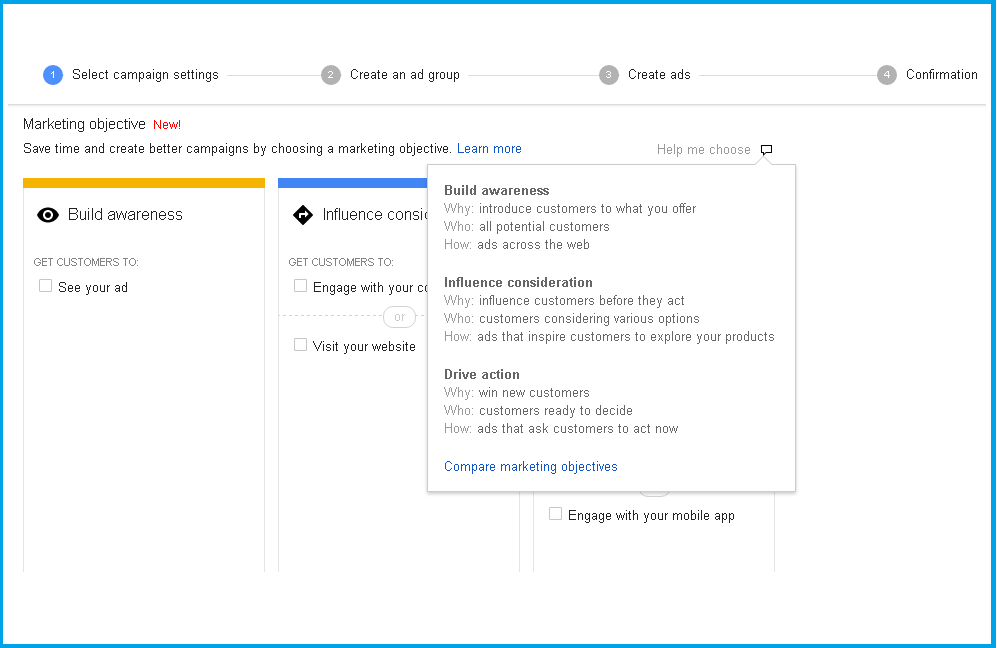
    With Dynamic Search Ads you can choose to go with Marketing objectives, that can be combined with remarketing campaigns.  You can choose the Marketing objective from sub-campaign types.

    ObjectivesObjves2


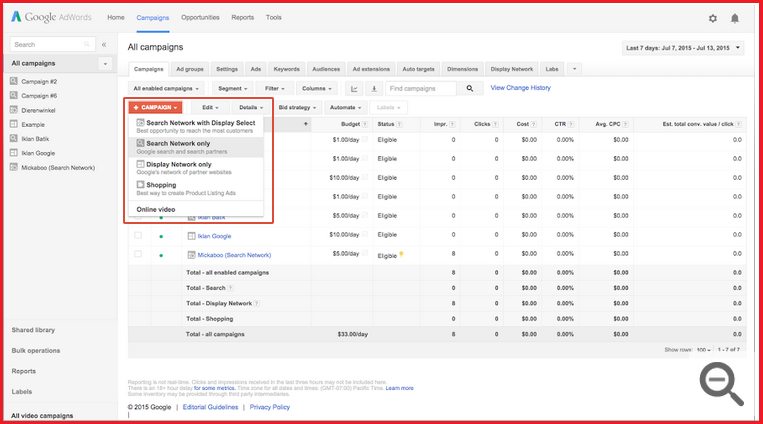
    Choose campaigns for Search Network only under the Campaigns tab.

    DSA1

    Within Search Network Tab Choose Dynamic Search Ads and enter Campaign Name.

    DSA4

    In the Dynamic Search Ads section, enter your domain and the language corresponding to the pages you want your ads to target.

    DSA2

    You can add an Ad group that allows you to spell out the lines you would like to use in the Search Ads, thereafter DSA’s automatically regenerates the Ad copy. You will be required to populate the URL where the product feed is hosted and the URL that you are going to use to track the campaign.

    You can also choose to add different variations of ads to decide on the most effective creative.

    If you would like to add more Dynamic Search Ads to the ad group of the campaign or to change rules, created:

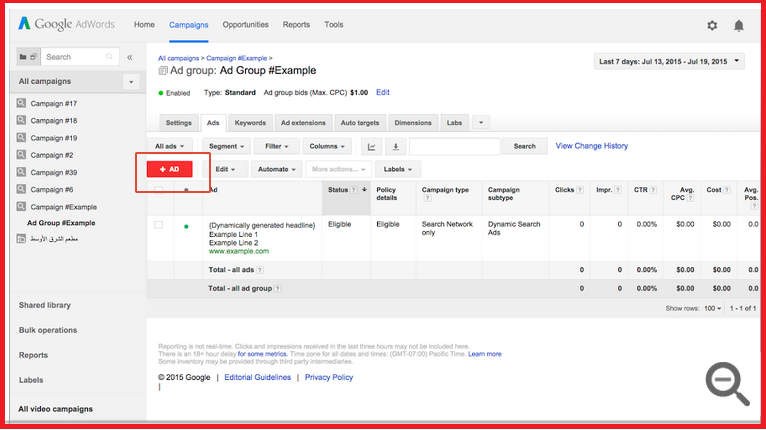
    • Click the Ads tab from the ad group you created for your Dynamic Search Ads campaign.
    • Click the +Ad button (as seen below)

    DSA3

    There are recommended categories that you  may wish to opt for.  To add more categories, select the categories that you wish to add. By hovering over the dialog icon to the right of category name, You can see sample pages and ads for each category.

    To target only certain webpages, select Use specific webpages (advanced). You can target the webpage URL that contains the page content for the products by including the page URL in the rules.

     Dynamic search Ads allow you to choose Marketing objectives, that can be combined with remarketing campaigns.  You can choose the Marketing objective from sub-campaign types.


Create your own website, free on WordPress.com.Create your own website.
Start free